
Agile Scrum is the most widely adopted agile methodology for project management, especially in software development. This guide provides a clear agile scrum process overview, explains the roles, ceremonies, and tools, and clarifies the differences between agile vs scrum to help you understand how to leverage these frameworks for efficient and adaptive project delivery.
What is scrum agile method?
Agile is a project management philosophy that emphasizes flexibility, collaboration, and iterative progress. Scrum is a specific framework within agile methodologies, designed to help teams deliver value in short, structured cycles called sprints. In other words, agile/scrum refers to using the Scrum framework to implement agile principles in practical, day-to-day project management.
And what’s more: Scrum method is an agile practice that can also help scale agile, which means gradually deploying agility at the enterprise level.
Agile vs Scrum: What’s the Difference?
- Agile methodology is a broad approach that includes various frameworks and practices aimed at delivering projects incrementally and adapting to change.
- Scrum is a framework within agile, providing a set of roles, ceremonies, and artifacts to structure work in short, repeatable cycles (sprints).
In summary: All Scrum is agile, but not all agile is Scrum. Teams may use other agile methodologies like Kanban or Lean, but Scrum is the most prescriptive and widely used.
3 fundamental principles in scrum agile method
In Scrum, the goal is to define a clear and precise working framework punctuated by short iterations to facilitate the implementation of complex projects. This specific framework revolves around three fundamental principles:
- transparency: each team member must have access to all information regarding the product to deliver;
- inspection: regular evaluations are essential to readjust the project if necessary;
- adaptation: the implementation of new measures is necessary when inspection shows deviations from the measured results.
Scrum roles
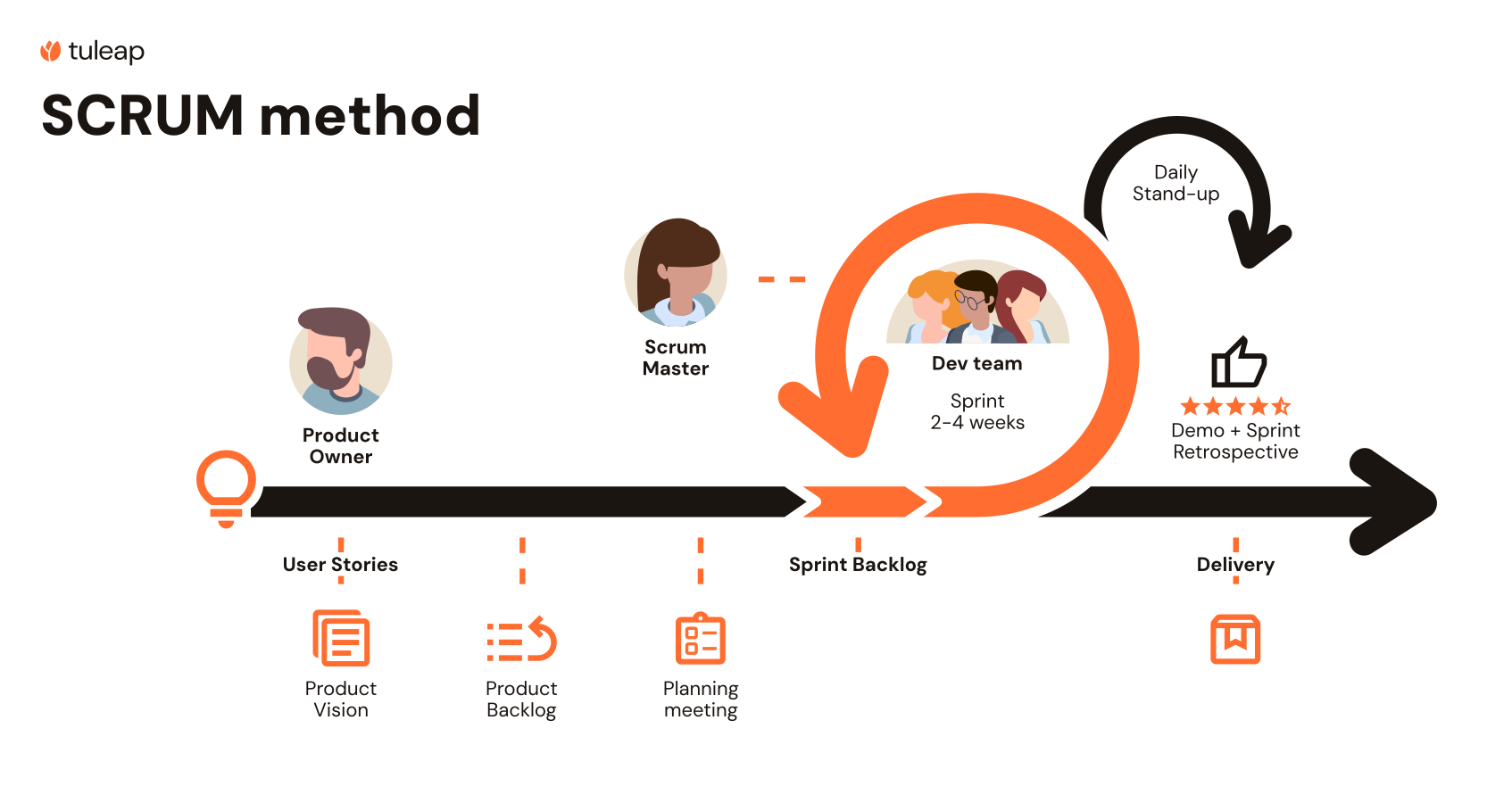
The Agile Scrum method defines 3 roles. They are all complementary, and it’s important to understand each one’s responsibilities.
Scrum Master
According to the Scrum Guide, the Scrum Master is a servant-leader dedicated to supporting the Scrum Team and ensuring the correct application of Scrum practices. But make no mistake, the Scrum Master is not a project manager. Their primary mission is to promote and uphold Scrum as defined in the guide. How do they do this? By helping everyone, both inside and outside the Scrum Team, understand the underlying theory, practices, rules, and values of Scrum. They also guide stakeholders in evaluating the value of their interactions with the team, distinguishing those that are helpful from those that might hinder progress. In short, the Scrum Master fosters an environment of continuous improvement and collaboration to help the team maximize the value they deliver. Here are more details about scrum master tools and tips to be a “good” Scrum Master.
Product Owner
In short, the Product Owner serves as the vital bridge between the business and technical aspects of a project. Acting as the voice of the customer, they connect stakeholders with the development team, ensuring that the product delivers real value. In Scrum, the Product Owner is the guardian of the product vision, fully embedded within the Scrum Team. They are responsible for defining and prioritizing the work by maintaining a clear and well-structured Product Backlog and writing user stories that reflect customer needs and business goals. Their decisions directly shape the direction of the product and guide the team toward delivering the most valuable outcomes.
Development team
The Development Team is responsible for turning expressed needs into working, usable features. This cross-functional team may include a wide range of roles and expertise, such as developers, software architects, functional analysts, UX/UI designers, ergonomists, and systems engineers. Together, they collaborate closely to deliver high-quality increments of the product, sprint after sprint. Their collective skills and shared ownership of the work are essential to bringing the product vision to life and meeting the expectations of users and stakeholders.
Scrum ceremonies
In Scrum, the lifecycle of a development project is punctuated by a set of meetings, each with a well-defined goal. Ceremonies such as the Daily Scrum, Sprint Planning, Sprint Review, and the Retrospective are fundamental tools for the Scrum Master. Let’s see what they’re all about.
Planning Poker
To promote collective intelligence while estimating user stories (see below), the Scrum Master uses Planning Poker: it enables team members to draw on their individual and collective experience to come up with an estimation in story points. With online Scrum tools like Tuleap, once the story points are defined, team members can easily enter them in the “User Story” service. This allows them to quickly check whether they have exceeded the capacity planned for the release and the sprint.
Sprint Planning
The Sprint Planning meeting is one of the most important steps in a Scrum development project. During this meeting, the development team selects the top-priority items from the Product Backlog that they believe they can complete during the sprint. This collaborative effort by the entire Scrum Team results in the creation of a Sprint Plan.
Daily Stand-up
The Daily Stand-up (also known as the Daily Scrum) is a key Agile ceremony designed to improve team communication and boost productivity. This short, daily meeting helps team members align on their ongoing tasks, report progress, and flag any blockers that could slow down the sprint. It’s also a great opportunity to foster team cohesion and mutual support. To make the workflow more visible, teams often use a Kanban board or a digital card wall to display all tasks and track project progress in real time.
Sprint Retrospective
The Sprint Retrospective is a key Scrum ceremony that drives continuous improvement. Held at the end of each sprint, it brings the entire Scrum Team together to reflect on what went well, what could be improved, and how to work better as a team. By reviewing key metrics such as the Burndown chart, Burnup chart, and Velocity and engaging in open discussion, the team identifies ways to optimize collaboration, enhance motivation and well-being, improve product quality, and boost overall productivity.
How to speak Scrum?
Product Backlog
The Product Backlog is a cornerstone of the Scrum framework, it’s the Product Owner’s primary domain. As the person in direct contact with stakeholders, the Product Owner is responsible for creating, organizing, and continuously refining the backlog to reflect evolving customer needs and business priorities.
Think of the Product Backlog as the dynamic engine driving product development. It contains a prioritized list of features, enhancements, fixes, and technical tasks, often expressed as user stories, that guide the team’s work. While the Product Owner manages its content and prioritization, the backlog must remain transparent and easily accessible to the Development Team to ensure alignment and shared understanding. It’s not just a to-do list, it’s a living artifact that evolves as the product and market context change.
Sprint
A sprint is a short period of time – or iteration – of 2 weeks up to 1 month to the max, during which the development team will design, realize and test new features. Several sprints result into a release. This iterative approach enables rapid feedback, continuous improvement, and steady progress toward the product vision.
Release
A release means a version of the product is delivered to final users. But a release can also refer to the period of time during which one version is under development, going through successive sprints, until the delivery. To put it simply, a release is the result of multiple sprints.
Epic
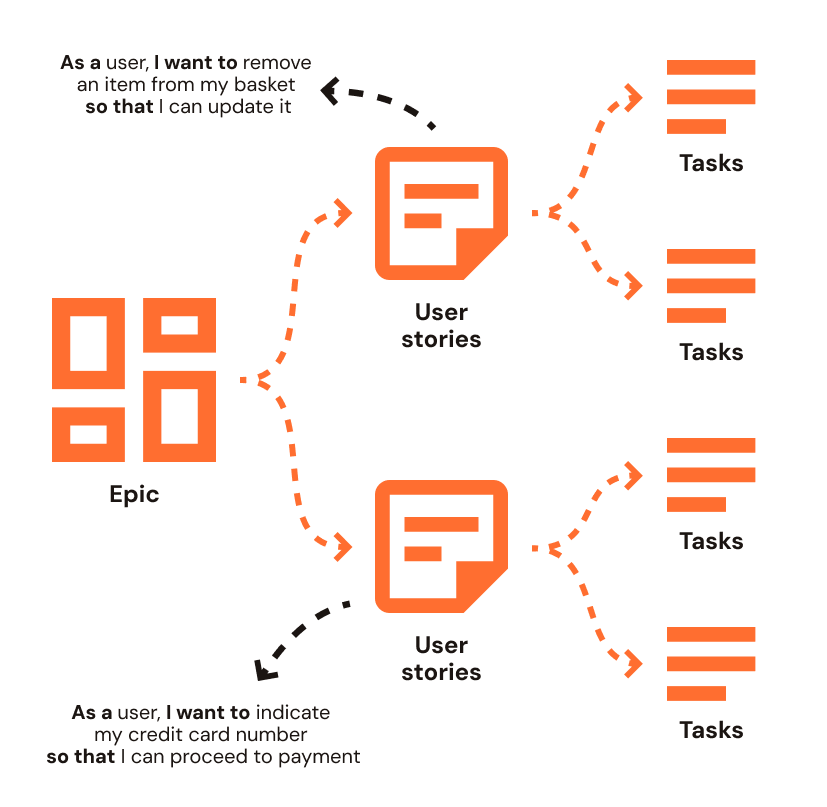
Generally speaking, an “Epic” is a macro functionality of the product to be developed. Epics can also be described as multiple sets of user stories grouped by categories or themes.
Story Point
Story points are workload estimation units. They are a way to estimate the effort required to achieve the development of a functionality. But it is NOT a man / day, nor a deadline for completion. A “story point” is an arbitrary measure set by the team. It can take different forms: T-shirt size (XS, S, M, L, XL), numbers from 1 to 10…
User Story
A “User story” is not a task, neither a specification. Rather, it is a statement of a user expectation. In Scrum, user stories are narrated according to a defined format: “As (persona), I want to (expression of the wish), so that (goal to achieve).”
Which gives for example: “As a user, I want to be able to delete an item from my basket so that I can update it.”
Task
Tasks and, when needed, sub-tasks represent the technical activities required to fulfill a user story. These are actionable, concrete items that the Development Team takes on during a Sprint. While tasks can vary in nature such as design, coding, testing, or documentation, they should ideally be similar in size and complexity to facilitate planning and progress tracking. Breaking down user stories into well-defined tasks helps the team work more efficiently and ensures smoother collaboration throughout the development process.
3 essential graphics in Scrum
Burndown and Burn-up
Burndown Chart
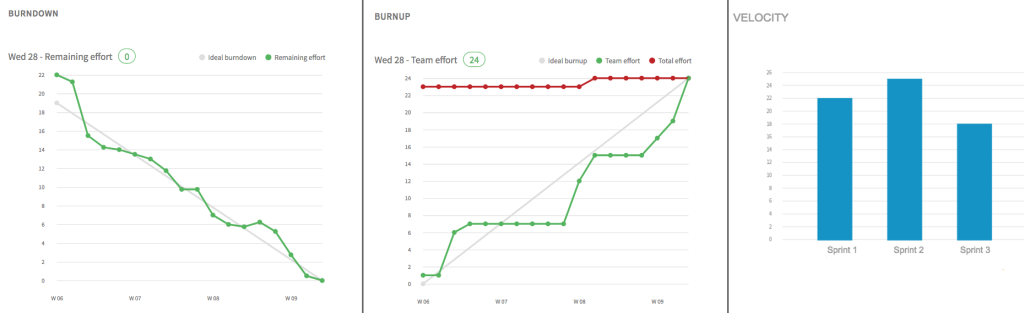
The Sprint Burndown Chart is a popular tool used at the sprint level to track progress. It visually shows the remaining work in the sprint backlog over time, helping the team quickly assess whether they are on track to meet their sprint goals. It provides a clear view of the sprint’s pace and can highlight early signs of delays or blockers.
Burnup Chart
The Sprint Burnup Chart illustrates the amount of completed work over time. One line represents the work done (often shown in green), while the other shows the total scope or release target (typically in red). This chart helps visualize both progress and scope changes, making it easier to manage expectations and monitor delivery trends.
Velocity
Velocity is a key metric in Scrum that helps teams plan future sprints more accurately. It represents the amount of effort a development team can handle during a sprint, typically measured in story points. To calculate it, teams average the number of story points completed across several past sprints.
Velocity is especially useful during Sprint Planning, as it helps determine how much work the team can realistically commit to.
However, it’s important to note that velocity is not a measure of performance or productivity. What truly matters is the business value delivered and the quality of the software produced, not just the number of points completed.
Capacity
During Sprint Planning, the team also takes into account its capacity, that is, the actual “availability” of team members for the upcoming sprint. Capacity reflects how much time and effort the team can realistically dedicate, factoring in absences such as vacation, public holidays, or training sessions. Adjusting for capacity helps ensure that the sprint backlog remains achievable and aligned with the team’s real workload potential.
Tips and tools for Scrum teams
A dedicated wall in the Agile team’s workspace to create a large Scrum board.
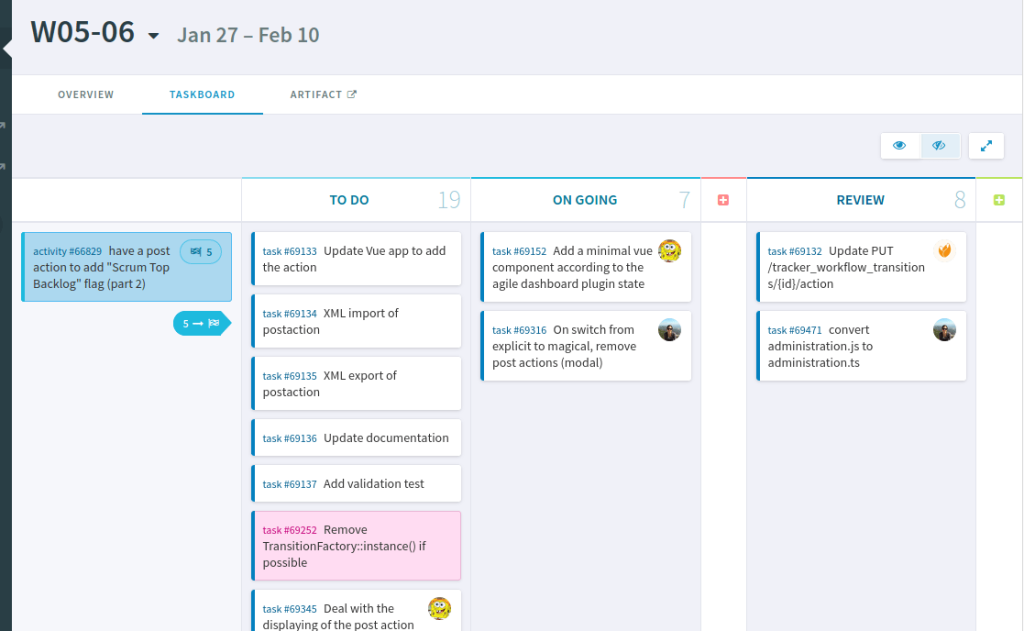
Set up a visual task board with clearly defined columns representing the different statuses of your user stories and activities such as To Do, In Progress, and Done to enhance transparency, team collaboration, and sprint tracking.
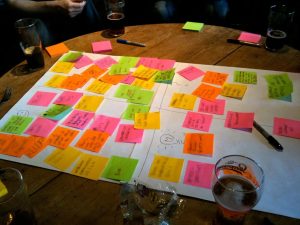
Post-its and Bold Markers: Scrum Essentials
A stack of post-its and a few big bold markers are must-haves in any Scrum team’s toolbox. The rule is simple: one post-it = one task or activity. Each note should be clear, concise, and easily readable by everyone, whether on a physical task board or during a stand-up meeting.
Pro tip: write short, meaningful words in large, bold letters to make sure your tasks are visible at a glance and avoid ambiguity.
« Scrum and XP from the trenches » aka The Scrum Bible
If you’re looking for a practical, real-world guide to Scrum, Scrum and XP from the Trenches is a must-read. Often referred to as the Scrum Bible, this book offers hands-on advice based on actual experience from the field, making it an invaluable resource for both new and seasoned Agile teams.
… then it comes the time for an online collaborative workspace
Post-its and a big white wall are a great way to get started with Scrum, as long as the whole team is in the same physical space. But in today’s world of distributed teams, hybrid work, and remote collaboration (not to mention the fact that post-its tend to fall off the wall sooner or later), relying on physical boards quickly reaches its limits.
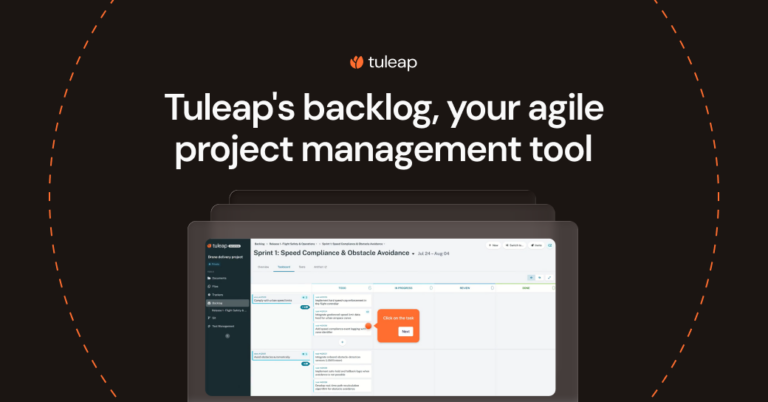
That’s where online Scrum tools come in. When teams are no longer co-located, a digital Agile solution becomes essential to maintain visibility, coordination, and productivity. Yes, it’s software to develop software, but not just any software: we’re talking about a full-fledged Enterprise Agile Project Management tool, like Tuleap, for example.
Why use a digital Scrum tool?
Among the most valuable features of the best Scrum tools:
- A shared product backlog accessible in real time
- Drag-and-drop cardwalls to easily move tasks across columns
- History tracking of all changes and decisions
- Burndown and burnup charts, velocity graphs, and planning views
- User story lifecycle management, from backlog to release
- Visibility on upcoming sprints and team capacity
In short, online Agile tools replicate the core principles of physical Scrum boards—but with added structure, traceability, and scalability.
And because we know that adopting a new tool can sometimes be a challenge, here are 5 practical tips to help your team embrace an Agile platform with ease.
Which Tool Should You Choose for Your Projects?
Tuleap
Tuleap is an ALM platform that makes implementing Scrum easier for development teams. It centralizes all the tools you need:
Backlog Management & Planning: Create, prioritize, and plan user stories, tasks, and sprints using visual boards and agile templates.
Agile Tracking & Metrics: Burn-down charts, burn-up charts, and velocity metrics to measure sprint progress and team performance.
Full Traceability: Link requirements, code, tasks, and tests for precise tracking and better compliance.
Centralized Collaboration: A single workspace for all teams, reducing silos and aligning processes.
Go further with Tuleap →