

🚀 Supercharge Your Documentation: Artidocs Now Display Artifact Metadata
Artidocs combine FreeText sections, for context and structure, and Artifacts, for formal requirements, traceability, and non-text data. But what if you could seamlessly integrate artifact metadata (status, priority, severity, …) directly into your documents?
Now you can.
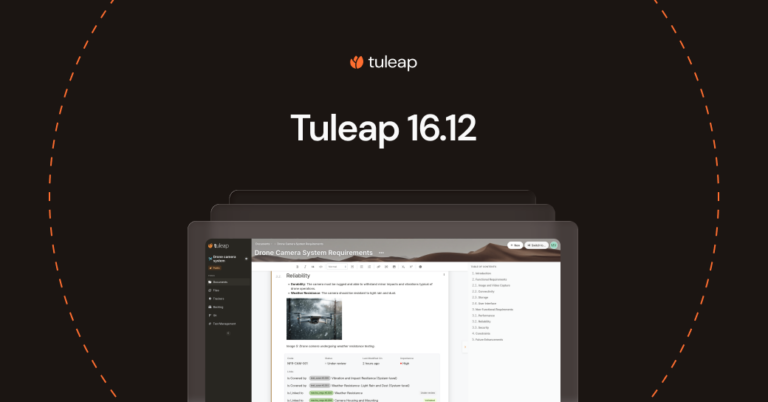
With Tuleap 16.12, Artidocs automatically render artifact fields in read-only mode, transforming static documents into dynamic, data-rich resources that stay in sync with your project.

In the screenshot above, you can see the fields in action. The example shows a System Requirement document, where Reliability is one of the artifacts. The document owner configured the document to display several fields:
- Code: The reference of the requirement (a String)
- Status: Indicates the stage in the workflow (a Select box)
- Last modified on: Self-explanatory (a Date)
- Importance: Indicates the value of the requirement (a Checkbox)
- Links between artifacts to verify that the requirement is covered by tests and connected to subsystem requirements.
✨ Why This Matters ?
- Always Up-to-Date: No more manual copy-pasting. Metadata updates as artifacts evolve, so your documents never fall out of sync.
- Traceability at a Glance: Instantly see which tests cover a requirement or how it connects to subsystem designs, directly in the document.
- One Document, Multiple Views: Tailor field visibility per document. Two Artidocs with the same artifacts can highlight different metadata for different audiences (e.g., engineers vs. auditors).
What is covered ?
Artidoc can render all types of fields, and these fields are displayed in read-only mode. You can easily edit them by clicking the “Go to artifact” link in the three-dot menu of the section. Permissions apply, so only the information the viewer is authorized to see will be displayed in the fields section.
Export to PDF
As with all other features, the rendering of fields is also included in the PDF export.

The ability to export as PDF can serve as an alternative to existing Word format exports when only a limited set of fields is needed in the final document.
Configuration
The selection of fields to be rendered in the document is done per document and can be configured by the document writer. It is possible to have two documents containing the same set of artifacts but with completely different field selections.

We decided to limit the configuration options for the fields. They can either be placed in columns (up to four columns) or in a dedicated row. We welcome your feedback if you need more advanced formatting capabilities.

More comfortable edition
Unrelated to read-only fields but equally important for daily use, two major improvements have been made to editing capabilities:
- Support of undo/redo (Ctrl-Z/Ctrl-Y)
- Support of emojis 🦄

Cross-Tracker Search links and performances
This is a continuation of the work done to integrate artifact links, introduced in Tuleap 16.10. It is now possible to include a @link_type column in the SELECT part of a query to display the type of links in the result column.

If there is no specific link type, the cell remains empty. If there is a type, it is displayed according to the link direction (forward/reverse), ensuring consistency with the arrow.
Performances
Thanks to your feedback, we identified some bottlenecks in the implementation. A series of fixes reduced the rendering time for reference queries by half.
Bye bye Vue2
Not all improvements are visible on your screen. To celebrate the development team’s achievement, we’d like to highlight their completion of the migration from Vue2 to Vue3. Vue.js is a JavaScript framework we use for parts of the application that require rich user interactions. The migration to the latest version took 3 years and 7 months, involving the partial rewrite of 33 applications.
Bugs and requests
During the 16.12 release cycle, 45 requests were implemented. Bugs and security fixes have already been back-ported on Tuleap Enterprise builds. You will find below a detailed list of fixes. The most notable ones are in bold.
Security
- #44489 Backlog item representations do not verify the permissions of the child trackers – CVE-2025-59040 – Moderate
Tracker
- #44456 Description not taken into account when creating a tracker from another one
- #44426 Wrong color shown when creating a tracker from another one
Artidoc
Test Management
- #44471 all_requirements should always be an array (REST API)
Subversion
- #44808 Help button to show SVN checkout instruction does not work
- #44472 JS error in project » svn » settings » access control
Site administration
- #44448 README.md file should be interpreted in “Manage Plugin” menu