



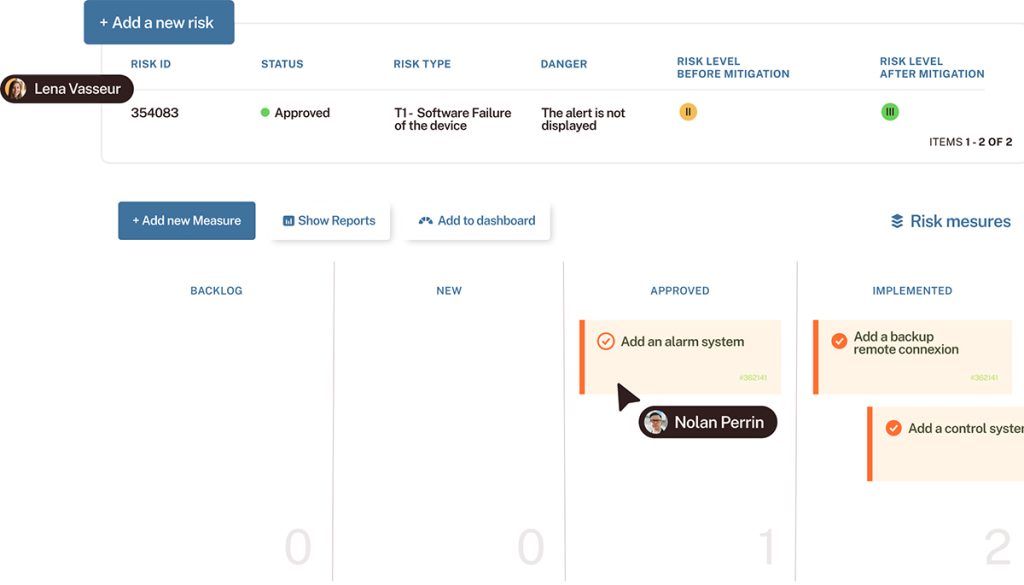
An issue is more than just an “Open” or “Closed” status. Behind every bug or enhancement request, there are decisions, code changes, tests, and approvals. With Tuleap, your teams can keep track of every issue throughout the software development process.
A bug reported by a customer. An enhancement requested by the Product Owner. An issue identified during testing.
For development teams, issues are part of everyday work. But between their creation and resolution, information can quickly become scattered across requests, technical tasks, code changes, test results, and more.
How can you track the entire lifecycle of an issue without losing sight of the connection between the initial request and its resolution?
With Tuleap Trackers, development teams get customizable issue tracking software connected to code and tests. This allows them to track every request throughout the resolution process, right through to validation.
Issue tracking software designed for development teams
An issue tracking tool should do more than simply record bugs. For Product Owners, it should also help manage enhancement requests, organize technical tasks, and monitor their resolution.
With Tuleap Trackers, teams get an issue tracking tool that adapts to their working methods, whether they use:

Bugs, enhancement requests, and tasks: tracking tailored to every activity
In Tuleap, issues are called artifacts. They are organized into Trackers, which can be configured to meet each project’s specific needs:
-
Bug tracking
-
Task management
-
User stories
-
Requirements
-
Enhancement requests
Each issue has a unique ID and centralizes all the information needed to handle it: description, priority, assignee, status, comments, and attachments.
More importantly, issues can be linked to one another. An enhancement request can be associated with several technical tasks, while a bug can be linked to the relevant user story.
This gives teams a more complete overview of the work to be done without losing the original context.
Workflows that adapt to the way you work
A critical bug and a new feature do not necessarily follow the same resolution process.
With Tuleap, teams can customize their issue workflows, including statuses, permitted transitions, approval rules, mandatory fields, and permissions.
Let’s take a bug as an example:

This workflow is fully configurable. For example, a team can require a comment before certain transitions or restrict approval to authorized users.
The goal? Stay in control of your processes without imposing the same workflow on every project.
From bug reporting to validation: track every step
Imagine a customer encounters an issue with an application: their data export is no longer working.
It may seem like a straightforward bug, but resolving it can involve several stakeholders: the Product Owner, developers, the QA team, and the project manager.
With Tuleap, every step can be tracked and linked back to the original issue.
1. Assess the bug and set priorities
It all starts with creating an issue in Tuleap.
The problem description, reproduction steps, user impact, priority, and assignee: all the information needed for diagnosis is centralized in one place.
The team can then:
-
Assess the bug’s severity
-
Request additional information
-
Decide what to do next: fix it immediately, schedule it for an upcoming sprint, or address it later.
Every update is recorded in the issue history. This allows teams to retrieve the full context of a request, even when they pick it up several days after it was first reported.
2. Organize development tasks
The diagnosis reveals that fixing the export issue requires several changes: an API modification, a UI adjustment, and a regression test.
Rather than grouping everything into a single issue, the team can create technical tasks and link them to the original bug.
Each developer tracks their own tasks, while the Product Owner or technical lead maintains an overall view of the work.
These activities can also be added to the backlog or a sprint, helping teams align bug fixes with other project priorities.
3. Link issues to Git commits and code reviews
The fix has been developed. But one essential question remains: which code changes actually resolved the bug?
With Tuleap’s Git and GitLab integration, development teams can reference their issues in commits, branches, and code review requests, depending on the service they use.
These references create links between Tuleap artifacts and the changes made in code repositories.
Developers can easily find the commits associated with a task, review a code review request, or understand why a particular change was made.
This is particularly useful when a bug reappears or a code change needs to be investigated several months after delivery.
4. Test the fix before closing the issue
The code has been fixed and the review is complete. But is the bug actually resolved?
With Tuleap Test Management, teams can organize test campaigns, track test executions, and record verification results.
In our example, the QA team checks that data exports are working again and that the fix has not introduced any regressions.
By linking test elements to the relevant issues, the team maintains a record of all the checks performed.
If a test fails, the issue can be sent back to development. If it passes, the fix can be approved and the issue closed according to the defined workflow.
The issue is closed, but its history remains accessible: from the initial problem to the development activities and associated validations.
4 benefits of issue tracking software connected to development
When an issue tracking tool is disconnected from code, testing, and planning, teams often have to reconstruct the history of a request themselves.
By integrating issue tracking into an ALM platform like Tuleap, teams can connect these activities and gain greater visibility into the development lifecycle.
1. Identify bottlenecks faster
Which bugs are still open? Which fixes are waiting for approval? Which tasks could delay a release?
Tuleap’s Kanban boards, reports, and dashboards make it possible to visualize progress, filter activities, and identify issues that require attention.
Teams can therefore:
-
Identify bottlenecks more quickly
-
Save time tracking activities
-
Focus their efforts on high-priority tasks
2. Trace the origin and history of every change
When an issue reappears, finding out why a fix was made can take time.
Thanks to the links between issues, tasks, code, and tests, Tuleap helps teams reconstruct the history of a request: why a change was made, who made it, and how it was verified.
This level of software traceability is also valuable for quality reviews and audits, particularly in regulated industries.
3. Improve coordination between developers, Product Owners, and QA teams
An issue can pass through several hands before it is closed.
By centralizing information, comments, decisions, and links between activities, Tuleap makes collaboration easier across all stakeholders.
Everyone can access the information they need to do their job, according to their access rights, without having to reconstruct the context at every stage.
Less scattered information, greater visibility into the work actually being done.
4. Improve responsiveness and customer satisfaction
A bug that takes too long to fix or an enhancement request that goes unanswered can quickly affect the customer experience.
Tuleap makes it easier to track issues and coordinate teams. This helps identify bottlenecks and manage requests more effectively.
The result: better-tracked requests, more reliable fixes, and improved customer satisfaction.
Issue tracking and ITSM: two complementary approaches
Not all issue tracking tools address the same needs.
An ITSM (IT Service Management) solution is designed to manage IT services: user incidents, support requests, changes, and service commitments.
Tuleap serves a different purpose: organizing, managing, and tracking software development activities.
Let’s take an example: a customer reports a malfunction to the IT support team. Their request is logged in an ITSM tool. After investigation, the incident turns out to be a bug that requires a software change.
The request can then generate a development issue in Tuleap. The team can organize the fixes, track the associated code, and validate the tests.
And what if the need goes beyond a simple bug fix? It can evolve into a larger development project, with its own backlog and activities.
ITSM manages the service request. Tuleap handles the development work that may result from it.
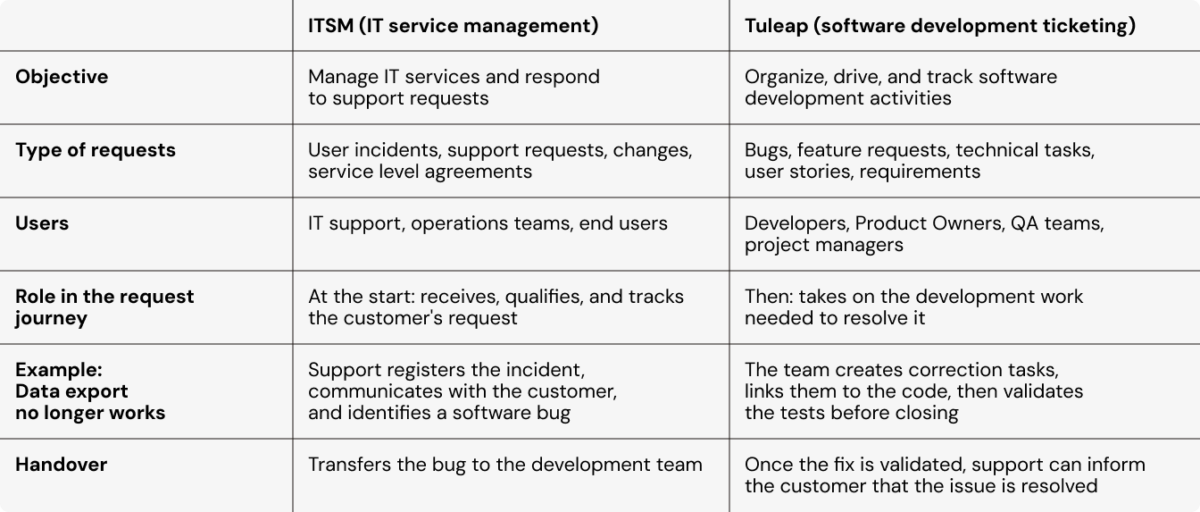
The two approaches complement each other, but Tuleap is not intended to replace a dedicated ITSM solution.
What if your issues were finally connected to your development activities?
From the initial report to final validation, every issue tells part of your product’s story.
With Tuleap, your teams do more than track statuses: they can connect requests, tasks, code, and tests, while adapting workflows to their own working methods.
Want to see how it works in a real-world scenario?
Discover Tuleap Trackers, their customization options, and how they integrate into the software development lifecycle with a personalized demo tailored to your needs.
Discover Tuleap Trackers, their customization options, and how they integrate into the software development lifecycle with a personalized demo tailored to your needs.
FAQ: issue tracking and issue management
What is issue tracking software?
Issue tracking software allows teams to record, organize, and track bugs, defects, enhancement requests, and project tasks, from creation through to resolution.
How do you track the lifecycle of an issue?
An issue’s lifecycle generally includes creation, assessment, assignment, resolution, testing, and approval. With Tuleap, teams can customize this process using configurable workflows.
Can you link issues to Git commits in Tuleap?
Yes. Tuleap allows teams to reference artifacts in Git commits and, depending on the configured integrations, in branches and Pull Requests or Merge Requests. This allows teams to maintain links between tasks and their associated code changes.
Is Tuleap an ITSM tool?
No. Tuleap is an ALM platform that includes features for managing software development issues. It can take over a request initially identified through an ITSM tool when a software fix or enhancement is required.


